

How a proxy server works: The complete technical guide


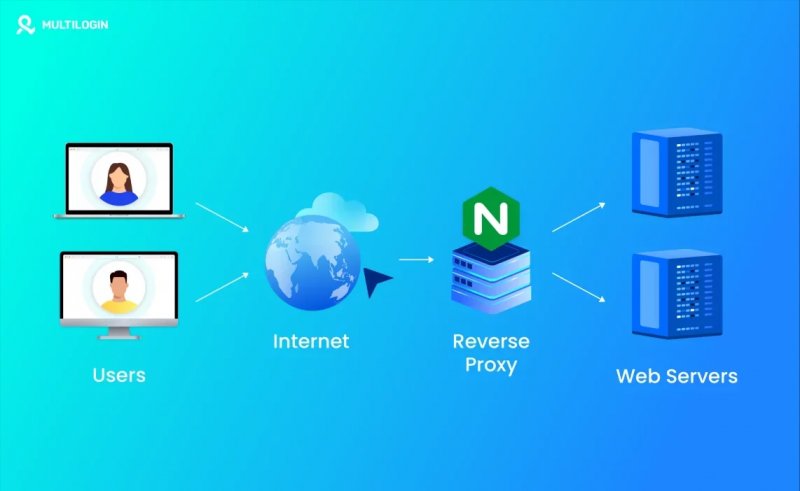
Discover exactly how a proxy server works – from request routing and IP masking to protocol handling and performance trade-offs. A technical deep dive for engineers and power users.
How a Proxy Server Works
Most explanations of proxy servers stay at the surface level – 'it hides your IP' – and stop there. That framing is technically incomplete and practically useless for anyone who needs to make real decisions about proxy infrastructure. Whether you're managing a scraping pipeline, operating multi-account workflows, or designing a network architecture, you need to understand what actually happens at the protocol level when traffic passes through a proxy.
This article breaks down the full request lifecycle, the differences between proxy protocols, anonymity models, and the operational trade-offs that determine whether a proxy configuration survives contact with production traffic.
What a Proxy Server Actually Does
A proxy server is a network intermediary that receives client requests, forwards them to a target server on the client's behalf, and relays the response back. From the target server's perspective, the connection originates from the proxy's IP address – not the client's. From the client's perspective, it appears to communicate directly with the target, though the path goes through an additional hop.
That single architectural fact – the substitution of source IP – is the foundation of everything proxies are used for, from geographic access control to IP reputation management. But the mechanism behind that substitution differs significantly depending on the proxy type and protocol in use.
The Request Lifecycle: Step by Step
When a client sends a request through a configured proxy, the sequence unfolds as follows. The client's TCP connection terminates at the proxy, not the destination. The proxy evaluates the request headers, applies any filtering or authentication logic, then opens a separate TCP connection to the origin server. The origin server responds to the proxy's IP. The proxy buffers or streams that response back to the client over the original connection.
For plain HTTP traffic, this is straightforward – the proxy can read, modify, or log every request and response header, including the Host field, cookie data, and referrer chains. For HTTPS, the process works differently. The client issues a CONNECT request to the proxy, naming the target host and port. The proxy establishes a TCP tunnel to that destination, and the TLS handshake occurs directly between client and server through that tunnel. The proxy cannot inspect the encrypted payload – it only knows the destination hostname and port, not the request path or response body.
This distinction matters operationally. HTTP proxies can rewrite headers, inject authentication, and cache responses. HTTPS tunnels through proxies are opaque – you get IP substitution, but no content inspection.
Proxy Protocols: HTTP, HTTPS, SOCKS4, and SOCKS5
The protocol determines not just what traffic the proxy can handle, but how it handles DNS resolution, authentication, and transport-layer behavior. The table below maps each protocol to its functional characteristics:
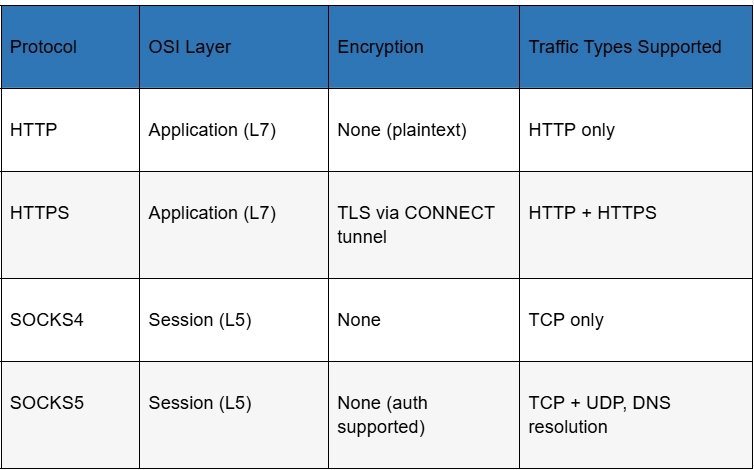
SOCKS5 is the most versatile option in this stack. Operating at the session layer rather than the application layer, it proxies any TCP or UDP traffic without inspecting or modifying the payload. It also supports remote DNS resolution – the proxy resolves domain names on behalf of the client, which prevents DNS leaks that can expose true location even when the connection itself is proxied correctly.
HTTP proxies are application-layer-aware, which makes them useful for header manipulation and caching, but limits them to HTTP/HTTPS traffic. They're the right tool for web-specific tasks; SOCKS5 is the right tool when you need transport-level generality.
Forward Proxies vs. Reverse Proxies
A forward proxy sits between clients and the external internet, acting on behalf of clients. This is the architecture most people mean when they say 'proxy server.' The client is aware of the proxy and must be configured to use it. The target server sees the proxy's IP and has no knowledge of the original client.
A reverse proxy inverts this arrangement. It sits in front of origin servers, handling incoming requests from the public internet on behalf of those servers. Clients direct traffic to what appears to be the target server but is actually the reverse proxy. Load balancers, CDN edge nodes, and web application firewalls commonly operate as reverse proxies. The client typically has no knowledge that a proxy is involved.
For most operational use cases – scraping, multi-account management, traffic arbitrage, access control – forward proxies are the relevant architecture. Reverse proxies are a server-side infrastructure concern.
Proxy Types by IP Origin: What the Difference Actually Means
The IP address a proxy presents to the target server comes from one of several sources, and that origin determines how detectable the proxy is and in what contexts it will function reliably. The comparison below covers the main categories:
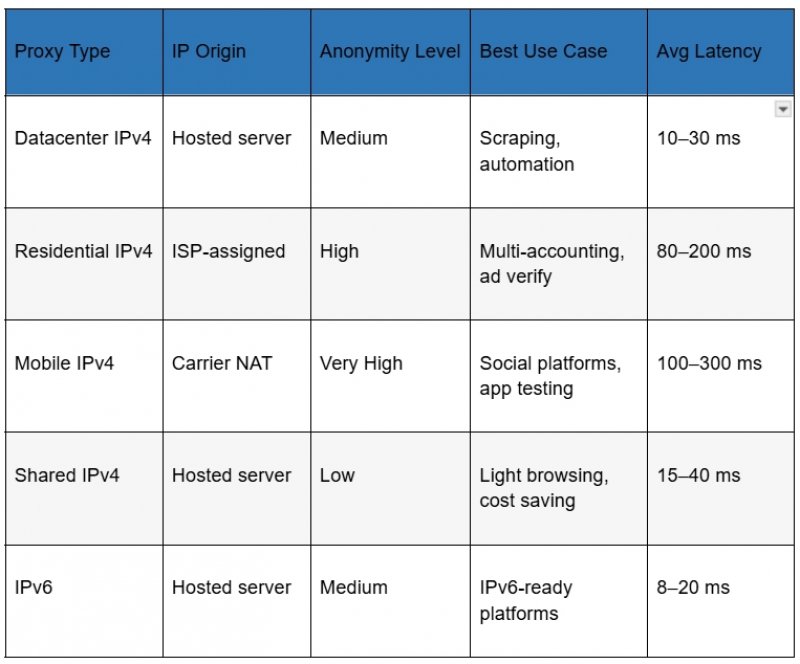
Datacenter proxies are hosted on cloud or dedicated hardware. They're fast and cheap, but their IP ranges are well-documented and routinely flagged by anti-bot systems. Residential proxies use IP addresses assigned by Internet Service Providers to real end-users – they carry the implicit trust signals that come with appearing to originate from an actual household. Mobile proxies go a step further: they originate from carrier NAT pools, where many users share IP addresses naturally, making aggressive rate limiting impractical without false positives.
The operational implication is direct: if the target platform has meaningful bot detection, datacenter IPs are the wrong tool. Residential or mobile IPs are necessary – but the quality of execution within that category still matters enormously. An IP with a poor reputation history, flagged subnets, or geolocation inconsistencies will fail regardless of its technical classification. Working with a provider that maintains clean IP pools with accurate geolocation data and low sharing ratios is not a preference – it is a technical requirement. Providers like proxys.io offer a structured product line that covers datacenter, residential, and mobile IP categories with individual access – meaning each IP is assigned to a single user, not shared across a pool of anonymous buyers.
Anonymity Levels: Transparent, Anonymous, Elite
Not all proxies mask your identity equally. The proxy industry uses three informal tiers to describe how much identifying information a proxy leaks to the target server through HTTP headers.
Transparent proxies forward the original client IP in an X-Forwarded-For header. The target server sees both the proxy IP and the real client IP. These are used in corporate networks and caching infrastructure – not for privacy.
Anonymous proxies send an X-Forwarded-For header but substitute a fake or empty value. The target server knows it's talking to a proxy but cannot identify the original client. Elite proxies, also called high-anonymity or level-1 proxies, send no X-Forwarded-For header at all. The request appears to originate from the proxy IP with no indication that a proxy is involved. For most anti-detection use cases, elite-level anonymity is the baseline requirement – not a premium feature.
DNS Handling and IP Leak Vectors
A correctly configured proxy can still leak location data if DNS resolution occurs outside the proxy tunnel. When a client resolves domain names locally – using the system DNS resolver – and only routes TCP traffic through the proxy, DNS queries exit the system through the default network interface, bypassing the proxy entirely. Any service that logs DNS queries, or any attacker in a position to observe them, can infer browsing behavior and geographic location regardless of what IP the HTTP connection uses.
SOCKS5 with remote DNS resolution (the proxy resolves names on behalf of the client) eliminates this vector. Applications that support this mode – most modern browsers in their proxy settings, many CLI tools via explicit configuration – should have it enabled. Applications that do not support remote DNS require a local DNS forwarder configured to route all queries through the tunnel.
WebRTC is a second common leak vector. Browsers that implement WebRTC can expose the real local and public IP addresses of the client through STUN binding requests, which bypass proxy settings entirely. Disabling WebRTC in browser settings or using anti-detect browser configurations is necessary for any workload where identity consistency matters. For a detailed breakdown of how to configure proxy settings across browsers and operating systems, the proxy setup guide for common environments walks through the process step by step.
Connection Pooling, Latency, and Throughput Constraints
Every proxy hop adds latency. The baseline penalty is the round-trip time between the client and the proxy, plus the round-trip time between the proxy and the origin. For geographically distributed proxies, this can add 100–300 ms to each request. For latency-sensitive workflows – real-time bidding, checkout automation, live data feeds – that overhead has direct operational consequences.
Connection pooling reduces per-request overhead by reusing established TCP connections to the origin rather than opening a new connection for each request. Most proxy infrastructure supports keep-alive connections, but whether this actually reduces latency depends on both the proxy server implementation and the origin server's keep-alive timeout settings. HTTP/2 multiplexing on the proxy-to-origin leg can further improve throughput for workloads that generate many parallel requests to the same host.
For high-volume scraping or concurrent session management, the bottleneck is usually not raw proxy speed but connection stability and IP reputation. An IP that triggers CAPTCHAs or gets throttled at 20% of its rated throughput is functionally slower than a slightly slower IP that completes requests cleanly.
When Proxy Infrastructure Becomes the Constraint
Most proxy-related failures in production are not caused by incorrect configuration – they're caused by IP quality issues that no amount of configuration can fix. An IP address with a history of abuse, flagged by fraud detection databases, registered under a suspicious ASN, or geolocated inconsistently across lookup services will underperform regardless of the protocol stack.
The signals to watch are: elevated CAPTCHA rates above 5%, connection refusals from target platforms rather than timeout errors (which indicate active detection rather than network issues), and account suspension patterns that correlate with IP rotation cycles rather than behavioral patterns.
When these signals appear, the correct response is to evaluate IP quality at the provider level – checking ASN reputation, subnet sharing ratios, and geolocation accuracy – rather than to adjust client-side configuration. If the provider cannot offer clean IP pools with verifiable geolocation and low reuse history, switching providers is the only effective remediation.
Choosing the Right Proxy Configuration for Your Use Case
The practical selection framework comes down to three variables: the target platform's detection sophistication, the required throughput and latency envelope, and the acceptable cost per IP. Each use case maps differently:
• Datacenter IPv4 is appropriate for targets with minimal bot detection – internal tools, APIs with simple rate limiting, or bulk requests to non-adversarial endpoints.
• Residential IPv4 is required for social platforms, e-commerce sites with active anti-bot systems, and any workflow where the IP's ISP classification influences trust scoring.
• Mobile IPv4 is necessary when carrier-grade NAT behavior is required – primarily social media platforms that apply heightened scrutiny to non-mobile IP ranges.
• SOCKS5 should be the default protocol selection for any multi-protocol or latency-sensitive workload, with HTTP proxies reserved for use cases where header inspection or caching is specifically required.
Conclusion
Understanding how a proxy server works at the protocol level is the prerequisite for using proxy infrastructure effectively. The IP substitution mechanism, the protocol stack, the anonymity model, and the DNS handling behavior are not implementation details – they are the variables that determine whether a proxy configuration succeeds or fails in a real-world environment.
Selecting the right proxy type for a workload requires matching the IP origin and protocol to the detection environment of the target platform. Maintaining reliable performance over time requires working with a provider that maintains IP quality at the infrastructure level. Configuration can optimize around a good IP, but it cannot rescue a bad one.
By Salman Rahimli


Similar news